Sum Calculator
Calculate sums online in real time with Sum Calculator. Enter or paste your numbers, hit Calculate, and get instant results.
Calculate the sum, count, and average of numbers. Supports CSV/Excel format for easy data import.
Commas separate values unless you tick the box below. Currency symbols ($ € £ ¥) are ignored; decimals, negative numbers and scientific notation are supported. Fix invalid entries before calculating. Press Ctrl+Enter to calculate.
Tip: commas are read as separators, so 1,000 counts as two numbers (1 and 000). If your list uses commas for thousands, tick the box above.
- Enter numbers separated by commas (,,), spaces, or new lines
- Copy and paste data directly from Excel or CSV files
- Use Ctrl+Enter for quick calculation
- Click copy buttons to copy individual results
- Download results as CSV or JSON files
Why Choose Sum Calculator?
Paste a column from Excel or Google Sheets, a CSV row or a typed list, and get the sum, count and average at once, with the whole addition written out underneath.
Instant Results
Results appear as soon as you press Calculate. The box takes up to 200,000 characters, which is tens of thousands of numbers, and long lists still add up in a moment.
CSV & Excel Support
Compatible with various data formats including comma-delimited, space-separated, and newline-separated values. Paste straight from Excel spreadsheets, CSV files, or plain text; currency symbols are ignored, and one tick handles thousands separators such as 1,234.56.
100% Local Processing
All calculations run locally in your browser. Your numbers never leave your device and are not sent to or stored on a server.
Mobile Friendly
Fully responsive design works perfectly on smartphones, tablets, and desktop computers. Calculate sums anywhere, anytime with our mobile-friendly interface.
Copy & Export
One-click copy results to clipboard or download as CSV/JSON files. Perfect for including sum calculations in reports, spreadsheets, or documentation.
High Precision
Decimal values, negative numbers, and extensive datasets are added exactly by the Sum Calculator, up to 20 decimal places, so totals are never rounded to two decimals.
Who Uses Sum Calculator?
Students, educators, accountants and analysts trust Sum Calculator for daily totals, grade tallies and large-scale dataset sums.
Academic & Learning Applications
Add up assignment scores, total the points on an exam, or check the answer to a homework sum. Handy for maths, statistics and other STEM coursework.
Teachers & Educators
Quickly calculate class averages, total points, grade distributions, and assessment scores. Streamline grading and student evaluation processes.
Financial & Business Analysis
Total an expense report, a stack of receipts or a month of invoices. Paste the amounts with their currency symbols and get the total in one step, ready for a budget or a reimbursement form.
Data Analysis
Process survey results, calculate statistical totals, analyze research data, and compute dataset sums. Essential for researchers and analysts.
How to Use This Calculator
Enter Numbers
Type numbers separated by commas (,,), spaces, or new lines. Copy from Excel or CSV.
Click Calculate
Press the Calculate button or use Ctrl+Enter for quick calculation.
Get Results
Instantly see the sum, count, and average. Copy or download results.
Accepted Input Formats
Comma Separated
Space Separated
New Line Separated
Mixed Format
How to Calculate a Sum
To calculate a sum, add all the numbers together. As a formula: Σx = x₁ + x₂ + … + xₙ, where Σ (sigma) means “add up” and n is how many numbers there are.
Example: add 12, 7.5, −3, 4.25 and 0.8.
- 12 + 7.5 = 19.5
- 19.5 + (−3) = 16.5
- 16.5 + 4.25 = 20.75
- 20.75 + 0.8 = 21.55
The total is 21.55. Adding a negative number is the same as subtracting it, so the −3 lowers the running total. There are 5 values, so the average is 21.55 ÷ 5 = 4.31. Paste the same five numbers into the calculator above and it shows the same sum, count and average, plus the addition written out so you can check homework or a receipt line by line.
The order doesn’t matter: you get the same total whichever way you add up a list. For a quick sanity check, round each number first (12 + 8 − 3 + 4 + 1 = 22) and make sure the exact total is close to it.
Adding a Column from Excel or Google Sheets
Select the cells in Excel or Google Sheets, copy them (Ctrl+C, or Cmd+C on a Mac) and paste them into the box above. Each cell arrives on its own line and the calculator reads one number per entry, so a whole column is added in one go.
- Currency symbols such as $, €, £ and ¥ are ignored, so $19.99 counts as 19.99.
- Accounting-style negatives in parentheses, such as (12), count as −12.
- Spreadsheets often copy numbers with thousands separators, like 1,234.56. Tick “Commas are thousands separators” for those; otherwise a comma separates values and 1,234 would count as two numbers, 1 and 234.
- An entry that isn’t a number, such as a column header like “Amount”, is flagged with its line number, and nothing is calculated until you remove or fix it.
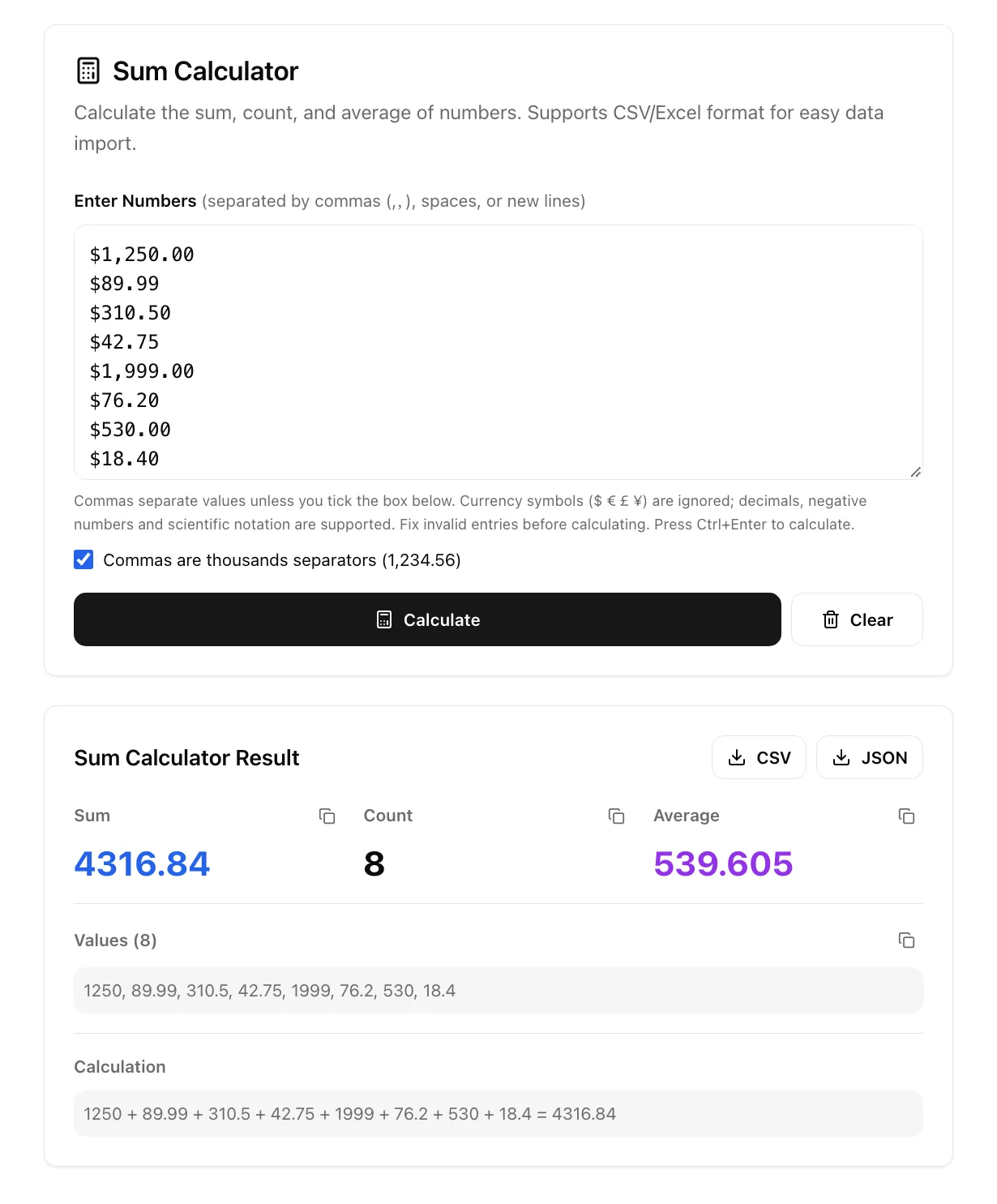
Inside a spreadsheet, =SUM(A2:A20) or AutoSum gives the same total when the cells sit in one range. The calculator is quicker when the numbers aren’t in a spreadsheet at all, such as a list from an email, a PDF or a chat, and when you want the count, the average and the full addition next to the total. For formulas, shortcuts and conditional totals, read our guide to calculating sums in Excel.
Frequently Asked Questions
What is the maximum number of values I can calculate?
The calculator accepts up to 200,000 characters of input, which is tens of thousands of numbers depending on their length. Everything is added in your browser, so even long lists take only a moment.
Can I use decimal numbers?
Yes! The calculator supports whole numbers, decimals, negative numbers and scientific notation such as 1e-7. Decimals are added exactly (up to 20 decimal places), so 0.1 + 0.2 shows 0.3 and 19.999 + 0.004 shows 20.003; the sum is never rounded to two decimal places.
How do I copy the results?
Each result (sum, count, average) has a copy button next to it. Click the copy icon to copy that specific value to your clipboard. You can also download all results as CSV or JSON files.
Does the calculator work on mobile devices?
Absolutely! The calculator is fully responsive and optimized for mobile devices. You can use it on smartphones, tablets, and desktop computers with the same functionality.
Is my data stored or transmitted?
No, your data is completely private. All calculations happen locally in your browser. We don't store, transmit, or have access to any of the numbers you enter.
How do I add up a list of numbers quickly?
Paste or type the list into the box at the top of this page, separated by commas, spaces or new lines, and press Calculate (or Ctrl+Enter). The sum, count and average appear together, with the addition written out underneath.
Can I add negative numbers and decimals?
Yes. Type negatives with a minus sign (-3) or in parentheses ((3)), and use a dot for decimals. Decimals are added exactly, so 12 + 7.5 + (-3) + 4.25 + 0.8 gives 21.55 with no rounding error.
Sum Calculator Blog
Quick, bite-size posts that walk you through real examples—totalling a CSV, finding an average, even checking variance—all in under five minutes.
Jan 7, 2026
Trapezoidal Sum Calculator: Quick Guide to Numerical Integration
Learn how to use a trapezoidal sum calculator for accurate numerical integration. Step-by-step examples, formulas, and practical applications explained.
Dec 20, 2025
Combination Sum Calculator: Match Amounts to a Target Total
Find which amounts add up to a target with our Target Sum Finder. Learn how one-use-per-line matching differs from combination sums with repeated values.
Dec 17, 2025
Sum of Geometric Series Calculator: Formulas, Examples & Free Tool
Calculate the sum of any geometric series instantly. Learn finite and infinite formulas, work through examples, and use our free geometric series calculator.
Dec 17, 2025
Partial Sum Calculator: How to Find Partial Sums of Any Series Fast
Use a partial sum calculator to quickly find the sum of the first n terms in any series. Learn formulas, examples, and when to use this essential math tool.
Nov 13, 2025
How to Calculate Riemann Sum: Step-by-Step Examples
Learn Riemann sums with step-by-step examples. Master left, right, and midpoint methods with formulas and applications.
Oct 27, 2025
What Is Sum in Math? Guide with Examples & Calculator
Learn what sum means in math and how to calculate it. Use our free online sum calculator for quick, accurate results.
About Sum Calculator
We built Sum Calculator for one purpose: add numbers fast and right. Paste a CSV column, an Excel line, or a space-separated list—hit Calculate and you’ll see the total in milliseconds, plus count and average. Every calculation runs entirely in your browser; no data is stored, shared, or uploaded. Perfect for students, teachers, analysts, and anyone who needs instant, accurate sums.
All Calculator Tools
Explore our complete collection of mathematical calculators. Each tool is designed for accuracy, speed, and ease of use.
Target Sum Finder
Find which of up to 20 amounts add up to a target. Each line is used once, with exact decimal matching.
Use CalculatorAverage Calculator
Calculate the mean (average) of multiple numbers with detailed steps.
Use CalculatorAverage of 2 Numbers
Quick and simple calculator for finding the average of two numbers.
Use CalculatorCount Calculator
Count how many numbers are in a list, with positive, negative, even, odd, and duplicate breakdowns.
Use CalculatorVariance Calculator
Calculate variance, standard deviation, and statistical measures.
Use CalculatorSum of Squares Calculator
Find Σx² and the sum of squared deviations Σ(x − x̄)² of a list, with the mean and working.
Use CalculatorSummation Calculator
Calculate series using sigma notation with step-by-step solutions.
Use CalculatorInfinite Sum Calculator
Evaluate convergent infinite series including geometric and p-series.
Use CalculatorRiemann Sum Calculator
Approximate definite integrals using various Riemann sum methods.
Use CalculatorSum of Series Calculator
Calculate arithmetic, geometric, harmonic and custom mathematical series.
Use CalculatorWhy Choose Our Calculators?
Get instant results with mathematical precision you can trust.
All calculations happen locally in your browser. No data stored or shared.
Works perfectly on all devices - desktop, tablet, and mobile.
Start Calculating Today
Free, no sign-up, and your numbers stay in your browser.